Difference between revisions of "mosCura:Recipe"
NolekAdmin (talk | contribs) (Created page with "The recipe area is where all test parameters are handled. ==4.1 Create recipe== Select Plus icon in top right-hand corner <gallery> File:MosCura_Recipe_1.png|Create recipe </...") |
NolekAdmin (talk | contribs) |
||
| (19 intermediate revisions by 3 users not shown) | |||
| Line 1: | Line 1: | ||
The recipe area is where all test parameters are handled. | The recipe area is where all test parameters are handled. | ||
| + | It can be set up in a couple of different ways. | ||
| − | == | + | ==Recipe handling== |
| − | + | For the basic handling of test parameters, see [[mosCura:Recipe_Handling|Recipe handling]]<br /> | |
| + | The recipe is a collection of test parameters, the mosCura enabled equipment can request.<br /> | ||
| + | The recipe is structured in different groups, e.g. general information, tools setup and sub-test parameters.<br /> | ||
| + | The recipe is requested by its recipe name. <br /> | ||
<gallery> | <gallery> | ||
| − | File: | + | File:MosCura_Recipe_structure.PNG|Recipe structure with 3 recipes |
</gallery> | </gallery> | ||
| − | + | ===Partial recipe=== | |
| − | + | [[mosCura:Recipe_Partial|Partial]]<br /> | |
| − | + | If multiple recipes have most of the test parameters set to the same values, and only a minor part of the recipes will be different. We can use a partial recipe structure. | |
<gallery> | <gallery> | ||
| − | File: | + | File:MosCura_Recipe_Partial_structure.PNG|Recipe structure with 3 partial recipes |
</gallery> | </gallery> | ||
| + | Then the editable values will be set from the partial recipe, and the rest will be overwritten from the recipe set as the master recipe. E.g. Recipe01. | ||
| − | == | + | ===Alias=== |
| − | < | + | [[mosCura:Recipe_Alias|Alias]]<br /> |
| − | + | ||
| − | </ | + | ===BOM=== |
| + | [[mosCura:Recipe_BOM|BOM]]<br /> | ||
| + | |||
| + | ===Bulk update=== | ||
| + | [[mosCura:Recipe_Bulk_Update|Bulk update]]<br /> | ||
| + | |||
| + | ===Export Recipes=== | ||
| + | [[mosCura:Recipe_Export_Recipes|Export Recipes]]<br /> | ||
| + | |||
| + | ===Mass Import=== | ||
| + | [[mosCura:Recipe_Mass_Import|Mass Import]]<br /> | ||
| + | |||
| + | ===Uploaded Recipes=== | ||
| + | [[mosCura:Recipe_Uploaded_Recipes|Uploaded Recipes]]<br /> | ||
| + | |||
| + | ==Machine Administrator== | ||
| + | |||
| + | ===Recipe settings=== | ||
| + | [[mosCura:Recipe_Settings|Recipe settings]]<br /> | ||
| + | |||
| + | ===Recipe Language control=== | ||
| + | [[mosCura:Recipe_Language_Control|Recipe language control]]<br /> | ||
| − | == | + | ===Recipe Config=== |
| + | [[mosCura:Recipe_Config|Recipe config]]<br /> | ||
| − | == | + | ===Recipe Multi values=== |
| − | + | [[mosCura:Recipe_Multi_Values|Recipe Multi values]]<br /> | |
| − | |||
| − | |||
| − | </ | ||
Latest revision as of 09:03, 27 January 2022
The recipe area is where all test parameters are handled. It can be set up in a couple of different ways.
Contents
Recipe handling
For the basic handling of test parameters, see Recipe handling
The recipe is a collection of test parameters, the mosCura enabled equipment can request.
The recipe is structured in different groups, e.g. general information, tools setup and sub-test parameters.
The recipe is requested by its recipe name.
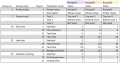
Recipe structure with 3 recipes

Partial recipe
Partial
If multiple recipes have most of the test parameters set to the same values, and only a minor part of the recipes will be different. We can use a partial recipe structure.
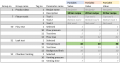
Recipe structure with 3 partial recipes

Then the editable values will be set from the partial recipe, and the rest will be overwritten from the recipe set as the master recipe. E.g. Recipe01.
