Difference between revisions of "mosCura:Recipe BOM"
Jump to navigation
Jump to search
MartinHeide (talk | contribs) |
MartinHeide (talk | contribs) |
||
| (4 intermediate revisions by the same user not shown) | |||
| Line 13: | Line 13: | ||
File:MosCura_RecipeBOM_1.png|Recipe BOM Create | File:MosCura_RecipeBOM_1.png|Recipe BOM Create | ||
File:MosCura_RecipeBOM_2.png|Recipe BOM form | File:MosCura_RecipeBOM_2.png|Recipe BOM form | ||
| + | </gallery> | ||
| + | |||
| + | ==Select BOM config== | ||
| + | #Click the icon next to "Select..." | ||
| + | #Select the desired BOM | ||
| + | #Click change | ||
| + | <gallery> | ||
| + | File:MosCura_RecipeBOM_8.png|Click the icon next to "Select..." | ||
| + | File:MosCura_RecipeBOM_9.png|Select the desired BOM | ||
</gallery> | </gallery> | ||
==Configure== | ==Configure== | ||
| − | #Optional, If more than one BOM configuration is needed, please enter the search criteria as | + | #Optional, If more than one BOM configuration is needed, please enter the search criteria as [https://www.w3schools.com/sql/sql_like.asp SQL Like operator]. E.g. AB% |
#Enter the code to use | #Enter the code to use | ||
#Click split | #Click split | ||
| Line 31: | Line 40: | ||
File:MosCura_RecipeBOM_7.png|Verify the result | File:MosCura_RecipeBOM_7.png|Verify the result | ||
</gallery> | </gallery> | ||
| + | |||
| + | ==Test BOM== | ||
| + | #In the left menu, select Test -> BOM | ||
| + | #Click the icon next to "Select..." | ||
| + | #Select the desired BOM | ||
| + | #Click change | ||
| + | #Optional. Update the Test value | ||
| + | #Click test | ||
| + | #Validate the result | ||
| + | <gallery> | ||
| + | File:MosCura_RecipeBOM_10.png|In the left menu, select Test -> BOM | ||
| + | File:MosCura_RecipeBOM_8.png|Click the icon next to "Select..." | ||
| + | File:MosCura_RecipeBOM_9.png|Select the desired BOM | ||
| + | File:MosCura_RecipeBOM_11.png|Click Test and validate result | ||
| + | </gallery> | ||
| + | |||
| + | ==Test Recipe with BOM activated== | ||
| + | [[mosCura:Test#Test BOM|Test recipe]]<br /> | ||
Latest revision as of 08:26, 6 September 2019
Contents
BOM
The BOM (Build Of Material) selection in mosCura is an option to scan the BOM directly into the mosCura recipe request.
mosCura will then, based on the config take specific characters, from the BOM, concatenate them, and use them as recipe name in the recipe request.
BOM Config
Before the BOM selection is available, you need to create and configure the BOM
Create BOM
- Click the plus sign in the top right hand corner
- Fill out the form
- Click save

Recipe BOM Create
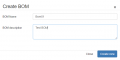
Recipe BOM form


Select BOM config
- Click the icon next to "Select..."
- Select the desired BOM
- Click change
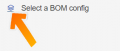
Click the icon next to "Select..."
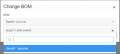
Select the desired BOM


Configure
- Optional, If more than one BOM configuration is needed, please enter the search criteria as SQL Like operator. E.g. AB%
- Enter the code to use
- Click split
- Select the value(s) needed, and enter from 1 to 50 to order the values
- Click Test
- Verify the result
- Click save
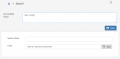
Enter the code to use
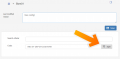
Click split
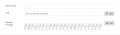
Select the value(s)
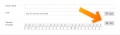
Click Test
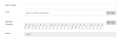
Verify the result


Test BOM
- In the left menu, select Test -> BOM
- Click the icon next to "Select..."
- Select the desired BOM
- Click change
- Optional. Update the Test value
- Click test
- Validate the result
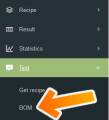
In the left menu, select Test -> BOM
Click the icon next to "Select..."
Select the desired BOM

Click Test and validate result


