mosCura:Report
Overview
mosCura Report Designer is a tool that can be used in order to create certificate reports of a tested part.
In Report Designer, after the user has generated a Report, there are multiple options for the type of the exportation. For example the Report can be exported into PDF, Excel files and more.
In order to make the Report Designer more efficient for the users of mosCura, we have created two areas where the users can work with the Reports. The first area is the Admin area, where in this area the Admin can configure a Report that can be used from all the users in the specific machine.
The second area of the Report Designer is only for each user of mosCura, where in this area each user can handle the report he prefers.
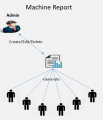
Admin Rights
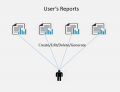
User Rights


Report Design
As it mentioned in the introduction, the Report Designer has been split into two Areas the Admin and the User.
Admin Report
When an Admin creates a configuration for a Report, this configuration can only be edited or deleted by the Admin, all the rest connected Users in the Machine they can just generate the Report.
User Report
In mosCura the user has the possibility to create personal reports, which can only be accessed by the user.
