Difference between revisions of "mosCura:Language"
Jump to navigation
Jump to search
NolekAdmin (talk | contribs) (Created page with "=2.1 User language= To change the user interface language, select the flag icon in the top right corner. thumb|border|400px|Change language Th...") |
NolekAdmin (talk | contribs) |
||
| Line 1: | Line 1: | ||
=2.1 User language= | =2.1 User language= | ||
To change the user interface language, select the flag icon in the top right corner. | To change the user interface language, select the flag icon in the top right corner. | ||
| − | |||
Then just select the language of your choosing. | Then just select the language of your choosing. | ||
| − | + | ||
| + | <gallery> | ||
| + | File:MosCura_Language_1.png|Change language | ||
| + | File:MosCura_Language_2.png|Select language | ||
| + | </gallery> | ||
=2.2 Edit language= | =2.2 Edit language= | ||
| Line 10: | Line 13: | ||
See specific module for more information. | See specific module for more information. | ||
Only applies to Machine admins. | Only applies to Machine admins. | ||
| − | + | <gallery> | |
| − | + | File:MosCura_Language_3.png|Recipe language handling | |
| + | File:MosCura_Language_4.png|Result language handling | ||
| + | </gallery> | ||
Revision as of 15:36, 13 August 2019
2.1 User language
To change the user interface language, select the flag icon in the top right corner.
Then just select the language of your choosing.

Change language
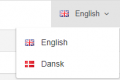
Select language


2.2 Edit language
For each module, select the Language Control. See specific module for more information. Only applies to Machine admins.
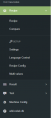
Recipe language handling
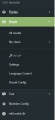
Result language handling


