Difference between revisions of "mosCura:User Configuration"
Jump to navigation
Jump to search
| Line 22: | Line 22: | ||
*[[mosCura:Query_Designer|Query Designer]]<br /> | *[[mosCura:Query_Designer|Query Designer]]<br /> | ||
| − | When the configuration is ready the | + | When the configuration is ready, the configured Report can be seen in the left side menu under the Report section and "My Reports". |
Revision as of 09:24, 9 September 2019
In order to configure a User Report the actions needed are:
- Connect to Machine.
- Navigate in the left side menu and extend the "Report" and "My Reports"
- Press "Create Report"
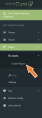
Create Report Menu

When the Create Report has been clicked the page of the Report configuration will open.
The configuration page is split into three steps:
Report Template
Static Info
Query Designer
When the configuration is ready, the configured Report can be seen in the left side menu under the Report section and "My Reports".
