Difference between revisions of "mosCura:Result CrossSearch Config"
Jump to navigation
Jump to search
(Created blank page) |
|||
| Line 1: | Line 1: | ||
| + | In order to work with the Cross Search functionality you have to configure the "Cross Search Tag No". | ||
| + | To configure it follow the next steps: | ||
| + | #Go to "Machine Configuration" | ||
| + | #On the right side press "Cross search Tag No" | ||
| + | #Select the column name | ||
| + | #Press "Save" | ||
| + | |||
| + | <gallery> | ||
| + | File: MosCura_Result_CrossSearch_MachineConfig.png| Machine Configuration | ||
| + | File: MosCura_Result_CrossSearch_MachineConfig_ConfigureClick.png | Press on the link "Not Configured" | ||
| + | File: MosCura_Result_CrossSearch_MachineConfig_SelectMachineObjectId.PNG | Select and Save | ||
| + | File: MosCura_Result_CrossSearch_MachineConfig_SelectedMachineObjectId.PNG | Selected Cross Search Tag No | ||
| + | </gallery> | ||
Revision as of 12:48, 4 November 2019
In order to work with the Cross Search functionality you have to configure the "Cross Search Tag No".
To configure it follow the next steps:
- Go to "Machine Configuration"
- On the right side press "Cross search Tag No"
- Select the column name
- Press "Save"
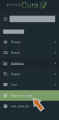
Machine Configuration

Press on the link "Not Configured"
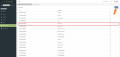
Select and Save
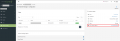
Selected Cross Search Tag No


