Difference between revisions of "mosCura:Recipe Alias"
Jump to navigation
Jump to search
| Line 36: | Line 36: | ||
For this functionality there are two options: | For this functionality there are two options: | ||
*[[mosCura:Recipe_Alias_Import_CSV|Import the Alias from a csv file.]]<br /> | *[[mosCura:Recipe_Alias_Import_CSV|Import the Alias from a csv file.]]<br /> | ||
| − | *[[mosCura: | + | *[[mosCura:Recipe_Alias_Import_XLSX|Import the Alias from a xlsx file.]]<br /> |
Revision as of 15:35, 30 October 2019
The recipe alias is an option to point serveral aliases to a specific recipe.
When the recipe alias is activated, the usual recipe name will not be available from the recipe request! ONLY the recipe alias!
Create alias
- Click the plus sign in the top right hand corner.
- Fill out the alias name. Must be unique
- Select the recipe to point to
- Click save
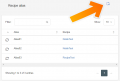
Create Recipe Alias
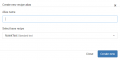
Recipe Alias form


Update alias
- Select the desired alias in the list
- Select the recipe to point to
- Click save
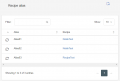
Recipe Alias list
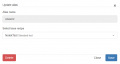
Recipe Alias update


Delete alias
- Select the desired alias in the list
- Click delete
- Confirm that you want to delete the alias
Recipe Alias list
Recipe Alias delete

Confirm delete

Import alias
In mosCura we have added the function to import Alias for the Recipes.
For this functionality there are two options:
