Difference between revisions of "mosCura:Result Config"
Jump to navigation
Jump to search
MartinHeide (talk | contribs) |
MartinHeide (talk | contribs) |
||
| (One intermediate revision by the same user not shown) | |||
| Line 5: | Line 5: | ||
File:MosCura_ResultConfig_2.png|Configuration of each tag | File:MosCura_ResultConfig_2.png|Configuration of each tag | ||
</gallery> | </gallery> | ||
| + | |||
| + | ===Tag types=== | ||
| + | ====Standard tag==== | ||
| + | The standard result tag is the default tag. Unless the tag is set as hidden, it will be a standard tag. | ||
| + | |||
| + | ====Hidden tag==== | ||
| + | The hidden tag will not show in the result handling, but the value will still be stored in mosCura. | ||
| + | |||
| + | [[mosCura:Result|Back to result]]<br /> | ||
Latest revision as of 07:53, 6 September 2019
In the result config you can change the configuration of each result item tag.
The entire result structure will be shown in the specific item groups.
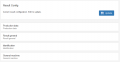
Result config
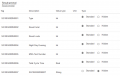
Configuration of each tag


Tag types
Standard tag
The standard result tag is the default tag. Unless the tag is set as hidden, it will be a standard tag.
Hidden tag
The hidden tag will not show in the result handling, but the value will still be stored in mosCura.
