Difference between revisions of "mosCura:Recipe Uploaded Recipes"
Jump to navigation
Jump to search
NolekAdmin (talk | contribs) |
NolekAdmin (talk | contribs) |
||
| (7 intermediate revisions by the same user not shown) | |||
| Line 3: | Line 3: | ||
==Uploaded Recipes== | ==Uploaded Recipes== | ||
Uploaded Recipes will behave like recipes created in mosCura. | Uploaded Recipes will behave like recipes created in mosCura. | ||
| + | |||
| + | ==Table== | ||
| + | A Table is shown on the Uploaded Recipes page. This is a table containing all of the recipes uploaded from the HMI. | ||
| + | |||
| + | ===Table Structure=== | ||
| + | |||
| + | The table contains: | ||
| + | *Recipe name | ||
| + | *Description | ||
| + | *Created by | ||
| + | *Date of creation | ||
| + | *Active (Inactive can mean that the upload needs to be confirmed from mosCura) | ||
| + | |||
| + | ==Selecting a Recipe== | ||
| + | Selecting a recipe in Uploaded Recipes can be done in 3 ways. | ||
===Select Recipe=== | ===Select Recipe=== | ||
| − | |||
| − | |||
#Click the icon next to "Uploaded Recipes" | #Click the icon next to "Uploaded Recipes" | ||
#Select the desired recipe | #Select the desired recipe | ||
#Click Select | #Click Select | ||
| + | |||
| + | <gallery> | ||
| + | File:MosCura_Recipe_UploadedRecipes_Select.png|Click the icon next to "Uploaded Recipes" | ||
| + | File:MosCura_Recipe_UploadedRecipes_Select2.png|Select recipe | ||
| + | </gallery> | ||
| + | |||
| + | ===Click Recipe name=== | ||
| + | #Click recipe name | ||
| + | |||
| + | <gallery> | ||
| + | File:MosCura_Recipe_UploadedRecipes_RecipeName.png|Click recipe name | ||
| + | </gallery> | ||
| + | |||
| + | ===Row Actions=== | ||
| + | #Click the Actions menu | ||
| + | #Click Edit | ||
| + | |||
| + | <gallery> | ||
| + | File:MosCura_Recipe_UploadedRecipes_ClickActions.png|Click the Actions menu | ||
| + | File:MosCura_Recipe_UploadedRecipes_ActionsEdit.png|Click Edit | ||
| + | </gallery> | ||
| + | |||
| + | ==Deleting an uploaded recipe== | ||
| + | It is possible to delete a recipe uploaded from the HMI. | ||
| + | |||
| + | #Click Actions | ||
| + | #Click Delete | ||
| + | #Confirm Deletion | ||
| + | |||
<gallery> | <gallery> | ||
| − | File: | + | File:MosCura_Recipe_UploadedRecipes_ClickActions.png|Click the Actions menu |
| − | File: | + | File:MosCura_Recipe_UploadedRecipes_ActionsDelete.png|Click Delete |
| + | File:MosCura_Recipe_UploadedRecipes_ActionsDeleteConfirmation.png|Confirm deletion | ||
</gallery> | </gallery> | ||
| + | |||
| + | ====IMPORTANT==== | ||
| + | A recipe can not be deleted if it has been used.</br> | ||
| + | Once a recipe is deleted it can not be restored. | ||
Latest revision as of 10:59, 27 January 2022
Uploaded Recipes is an option to see the recipes uploaded from HMI
Contents
Uploaded Recipes
Uploaded Recipes will behave like recipes created in mosCura.
Table
A Table is shown on the Uploaded Recipes page. This is a table containing all of the recipes uploaded from the HMI.
Table Structure
The table contains:
- Recipe name
- Description
- Created by
- Date of creation
- Active (Inactive can mean that the upload needs to be confirmed from mosCura)
Selecting a Recipe
Selecting a recipe in Uploaded Recipes can be done in 3 ways.
Select Recipe
- Click the icon next to "Uploaded Recipes"
- Select the desired recipe
- Click Select

Click the icon next to "Uploaded Recipes"
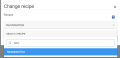
Select recipe


Click Recipe name
- Click recipe name

Click recipe name

Row Actions
- Click the Actions menu
- Click Edit

Click the Actions menu

Click Edit


Deleting an uploaded recipe
It is possible to delete a recipe uploaded from the HMI.
- Click Actions
- Click Delete
- Confirm Deletion
Click the Actions menu

Click Delete
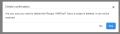
Confirm deletion


IMPORTANT
A recipe can not be deleted if it has been used.
Once a recipe is deleted it can not be restored.
