Difference between revisions of "mosCura:Recipe Bulk Update"
Jump to navigation
Jump to search
MartinHeide (talk | contribs) (Created page with "The recipe bulk update, is a possibility to update one tag on several or all recipes. But please be aware that this process can take several minutes, depending on the amount o...") |
MartinHeide (talk | contribs) |
||
| (One intermediate revision by the same user not shown) | |||
| Line 5: | Line 5: | ||
#Enter Last modified reason | #Enter Last modified reason | ||
#Select recipe(s) or click Select all | #Select recipe(s) or click Select all | ||
| + | #Click Update all | ||
| + | #If an error occurs, an error message will be shown | ||
<gallery> | <gallery> | ||
File:MosCura_RecipeBulkUpdate_1.png|Select tag, value and Last modified reason | File:MosCura_RecipeBulkUpdate_1.png|Select tag, value and Last modified reason | ||
| − | File:MosCura_RecipeBulkUpdate_2.png|Select recipe(s) | + | File:MosCura_RecipeBulkUpdate_2.png|Select recipe(s), or click Select all |
</gallery> | </gallery> | ||
[[mosCura:Recipe|Back to recipe]]<br /> | [[mosCura:Recipe|Back to recipe]]<br /> | ||
Latest revision as of 14:56, 23 September 2019
The recipe bulk update, is a possibility to update one tag on several or all recipes. But please be aware that this process can take several minutes, depending on the amount of recipes in the system.
Enter values
- Select tag
- Enter value
- Enter Last modified reason
- Select recipe(s) or click Select all
- Click Update all
- If an error occurs, an error message will be shown
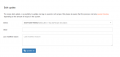
Select tag, value and Last modified reason

Select recipe(s), or click Select all


