Difference between revisions of "mosCura:Admin Configuration"
Jump to navigation
Jump to search
| Line 1: | Line 1: | ||
To start the process of report configuration: | To start the process of report configuration: | ||
| − | |||
| − | |||
| − | |||
<gallery> | <gallery> | ||
| − | File:Report_machine_config.png | Machine config menu | + | File:Report_machine_config.png | Click Machine config in the menu |
| − | File:report_machine_shared_button.png | New shared report | + | File:report_machine_shared_button.png | Press New shared report |
</gallery> | </gallery> | ||
Revision as of 10:32, 9 September 2019
To start the process of report configuration:

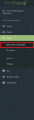
Click Machine config in the menu

Press New shared report


When the new shared report has been clicked the page of the Report configuration will open.
The configuration page is split into three steps:
Report Template
Static Info
Query Designer
When the configuration is ready, the configured Report can be seen under the Report section in the left side menu.
Last Created Report

