Difference between revisions of "mosCura:User Configuration"
Jump to navigation
Jump to search
| Line 5: | Line 5: | ||
<gallery> | <gallery> | ||
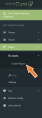
| + | File: report_user_config.png|Create Report Menu | ||
</gallery> | </gallery> | ||
Revision as of 11:46, 6 September 2019
In order to configure a User Report the actions needed are:
- Connect to Machine.
- Navigate in the left side menu and extend the Report and "My Reports"
- Press "Create Report"
Create Report Menu

