Difference between revisions of "mosCura:Recipe Alias"
Jump to navigation
Jump to search
MartinHeide (talk | contribs) |
|||
| Line 30: | Line 30: | ||
File:MosCura_RecipeAlias_5.png|Confirm delete | File:MosCura_RecipeAlias_5.png|Confirm delete | ||
</gallery> | </gallery> | ||
| + | |||
| + | ==Import alias== | ||
Revision as of 13:44, 30 October 2019
The recipe alias is an option to point serveral aliases to a specific recipe.
When the recipe alias is activated, the usual recipe name will not be available from the recipe request! ONLY the recipe alias!
Create alias
- Click the plus sign in the top right hand corner.
- Fill out the alias name. Must be unique
- Select the recipe to point to
- Click save
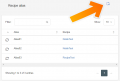
Create Recipe Alias
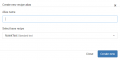
Recipe Alias form


Update alias
- Select the desired alias in the list
- Select the recipe to point to
- Click save
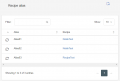
Recipe Alias list
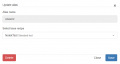
Recipe Alias update


Delete alias
- Select the desired alias in the list
- Click delete
- Confirm that you want to delete the alias
Recipe Alias list
Recipe Alias delete

Confirm delete

